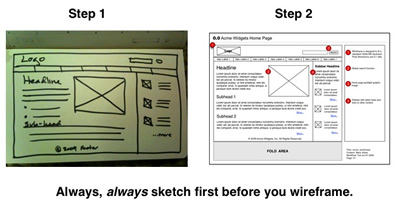
What Are Wireframes?
What Are Wireframes Used For?
Wireframes are great for visual communication, solving design problems and building team consensus. People will understand what you’re trying to say better and faster with pictures. It helps them see how things are connected, whether or not something is missing and how changes to one thing may impact something else.
An agency creative director once asked me what I found compelling about working in plain old black and white. With all due respect, I told her that what I love most about wireframes is that they help teams focus clearly on content and functionality. Just the facts, ma’am. No graphic design – just placeholders for navigation, content, and notes on system behavior. Plus, despite what she may think, it’s a very creative exercise.
How Do Wireframes Help?
From a timing and cost perspective, wireframes help designers work through a variety of site layouts before they commit a full team of resources to the project. This can save clients big bucks. Just like you wouldn’t build or renovate a house without a clear blueprint, you shouldn’t build or redesign a web site or web application without wireframes.
But wireframes are only one step in a larger process of first understanding business goals, user needs, and site requirements. Before you even touch a wireframe you need a clear understanding of what it is you want to build. And that’s what sketching is for.
In their book Information Architecture: Blueprints for the Web, Christina Wodtke and Austin Govella state “Information Architecture is good thinking written down”. More specifically, wireframes represent good team thinking written down. They simply cannot be done in a vacuum.
So before you start cranking them out in your favorite software program, grab your sketchbook and get everyone involved in the project together, either on the phone or in person. People think visually and respond much faster to visual images. Capturing good team thinking into a visual diagram takes skill, patience and perseverance. The trick is to nail the requirements early on from all project stakeholders.
Hold A Requirements Gathering Work Session
The first step is to schedule a requirements gathering work session. This is usually a 90-minute to two-hour meeting that includes everyone working on the project, especially senior decision makers. If that’s not possible, make sure everyone understands the potential downstream impact of leaving that person (or persons) out of the discussion.
These meetings can be done in person or remotely using Zoom or similar collaboration tools. If it’s a remote gathering make sure everyone has a good Internet/phone connection and can view your presentation link.
If it’s an in person meeting bring snacks and get a decent sized conference room. A large whiteboard in a conference room is great. If you can’t get that bring a pad of oversize post its and stick ’em up all around the room. Online or live, make sure you’re ready to rock at the appointed start time.
Start Gathering
Start by asking some basic questions. Who’s the audience? What makes them pay attention, and what will make them take action? Some organizations will have a creative brief available. For others this may be their first opportunity to explore this critical question. Try to find out as much as you can about who the site is for and what makes them tick. If time allows, sketch out rough personas representing each user type. Make sure everyone is in agreement on this. Knowing your audience and their hot buttons is the most important place to start.
Brainstorm every known feature, function, or desired content element that you know about. Allow each person in the meeting to provide input. Now prioritize them. This is where the discussion can get lively and your facilitation skills are critical.
At this point you should be able to sketch out a rough site map with top level navigation and get everyone to agree on it in principle. If there are still open issues, make note of them and keep moving. Now it’s time to drill in to each individual page template as a wireframe.
Start with the home page and work your way through the top level navigation. Remember, these are just sketches at this point and easy to change. Since they are in such a simple format they are more likely to elicit further input from the team as everyone starts seeing it all come together.
Putting It All Together
By the end of the meeting you’ll have a whiteboard or computer screen full of ideas, or perhaps an entire pad of post-its stuck to the wall. Your job now is to organize all this material in a way that’s relevant to you. This is where your humble sketchbook earns its keep. If you’re in an office setting it’s also useful to take some pictures of everything that got plastered to the wall.
Take your time and make careful notes of how the team envisions the system. Keep in mind you may need to reschedule another work session for further exploration. Assuming the meeting was a success, you should have everything you need to start creating wireframes in your favorite software program.
Keep your sketchbook handy and crank away, but remember this is only the beginning of an iterative process; you’ll want to get those same people together a few more times as the prototype system becomes more solid, at least on paper.
Common UX Design Software
Get my UX Sketching Cheat Sheet.
Subscribe to download a handy cheat sheet you can use for your next UX sketching session.
[…] for two of mine below). If you’re a wireframing junkie like me you will love these. 12. Wireframe 101: Sketch First, Wireframe Later Here’s my own philosophy and approach to making wireframes. 13. How To Make A Wireframe […]
[…] Wireframe 101: Sketch First, Wireframe Later: Mary Shaw explains the importance of always sketching first before you wireframe. […]
[…] Wireframe 101: Sketch First, Wireframe Later […]
[…] Artigo: Sketch First, Wireframe Later […]
[…] Sketch first, wireframe later • To sketch or not to sketch? – That is the question • 10 free wireframing tools for […]
[…] drawing abilities, assuming they aren’t distracted by the artistry. When we think of it this way, “it’s a very creative exercise.” Unfortunately, not everyone can create that kind of picture, and even those who can might spend too […]